

Should You Use Google Ads Auto-Apply Recommendations?
One of the biggest changes in Google Ads over the last several years has been the platform’s growing reliance on automation.
Google increasingly encourages advertisers to use automated tools designed to optimize campaigns using real-time data and machine learning. Features like Smart Bidding, automated targeting, and AI-generated recommendations are now built into nearly every part of the platform.
For businesses trying to simplify campaign management, automation can sound appealing.
In theory, Google continuously analyzes campaign performance and automatically makes adjustments to improve results.
One feature built around this idea is called Auto-Apply Recommendations.
This setting allows Google to automatically implement certain account recommendations without requiring manual approval from the advertiser.
At first glance, that may seem helpful. But automation without any oversight can create problems over time.
Why Does Google Push Automation in Google Ads?
Google Ads campaigns have become increasingly automated over the last several years.
Features like Smart Bidding evaluate signals such as:
- search intent
- device type
- location
- time of day
- historical conversion behavior
Automation allows Google to process these signals faster than manual campaign management alone.
And to be clear, automation itself is not inherently bad.
Features like Smart Bidding can absolutely improve performance when conversion tracking and campaign structure are set up correctly.
The issue stems from how much control advertisers hand over without reviewing the changes actually being made inside the account.
What Happens When Google Ads Auto-Apply Recommendations Are Left On?
Recently, our team at BlinkJar Media partnered with a new client and inherited a Google Ads account in which every Auto-Apply Recommendation setting was enabled.
That immediately raised concerns because Google had been making ongoing changes inside the account without anyone consistently reviewing them.
As we reviewed the account history, we found a long list of automated updates had been applied over time.
Some included:
- enabling broad match keywords
- expanding targeting through AI-driven features
- automatically generating ad assets
- pulling website content into ads
- enabling Final URL expansion to different landing pages
Individually, some of these tools can be useful in the right situations.
But when every recommendation is accepted automatically, campaigns can slowly begin operating very differently from how they were originally intended.
Over time, those changes can affect lead quality, messaging consistency, targeting control, and overall strategy.
Are Google Ads Auto-Apply Recommendations Bad?
Not necessarily.
Some recommendation categories can absolutely be helpful.
Automation tools can improve efficiency and help campaigns adapt faster to changing auction conditions.
But Google still doesn’t understand your business priorities the way you do.
It doesn’t know:
- which leads are most valuable
- which services are most profitable
- which searches attract poor-fit customers
- which landing pages convert best
Automation can support campaign management, but it should not completely replace strategic oversight.
How Can You Monitor Changes Made by Google Ads Automation?
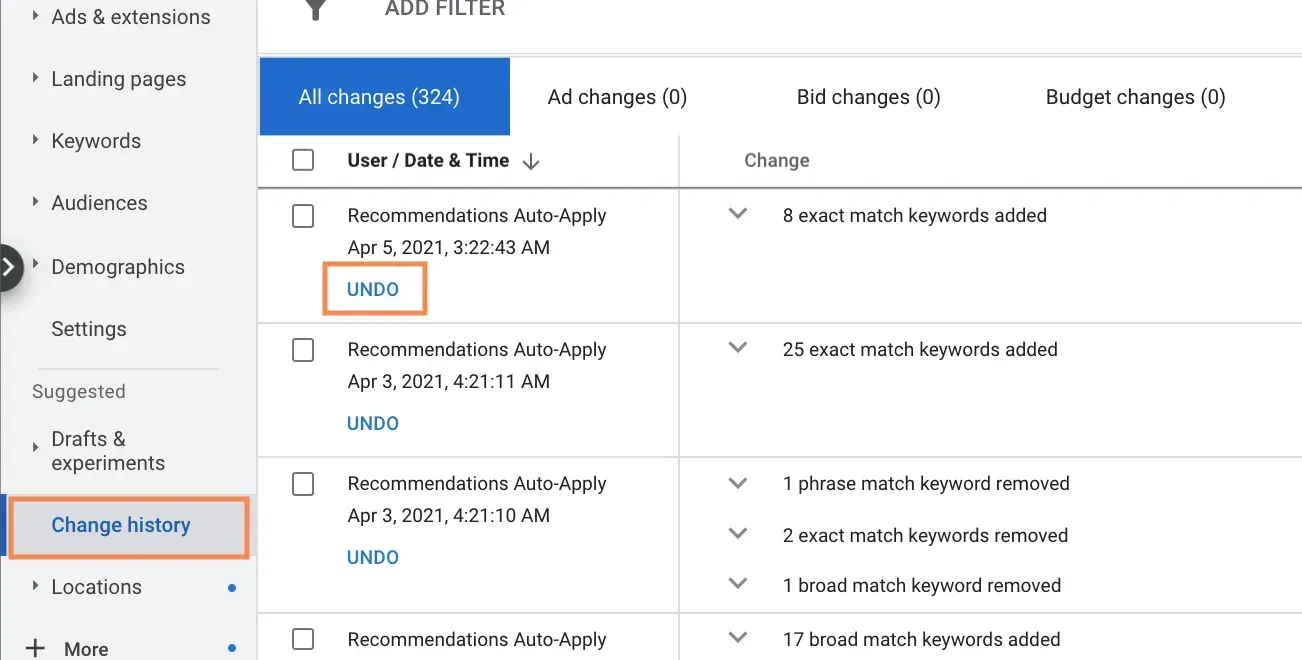
One of the most useful tools for reviewing automated changes is the Change History tab inside Google Ads.
This section records updates made throughout the account, including:
- bidding strategy changes
- keyword updates
- targeting adjustments
- recommendation changes
- automated system updates
Reviewing Change History regularly can help advertisers understand what may be influencing performance over time.
Without monitoring those updates, automated changes can quietly shift campaign strategy without anyone realizing it.
Should You Leave Auto-Apply Recommendations Turned On?
The answer depends on how actively the account is being monitored.
Some recommendation categories may make sense to enable, while others may introduce unwanted changes over time.
Understanding what’s happening inside your Google Ads account is often the first step toward improving campaign performance.
At BlinkJar Media, we help businesses create, manage, and optimize Google Ads campaigns through ongoing monitoring, strategic adjustments, and active campaign management designed to support stronger long-term results.
If you’re looking for help improving your Google Ads performance, connect with our team to learn how BlinkJar Media can support your advertising efforts.